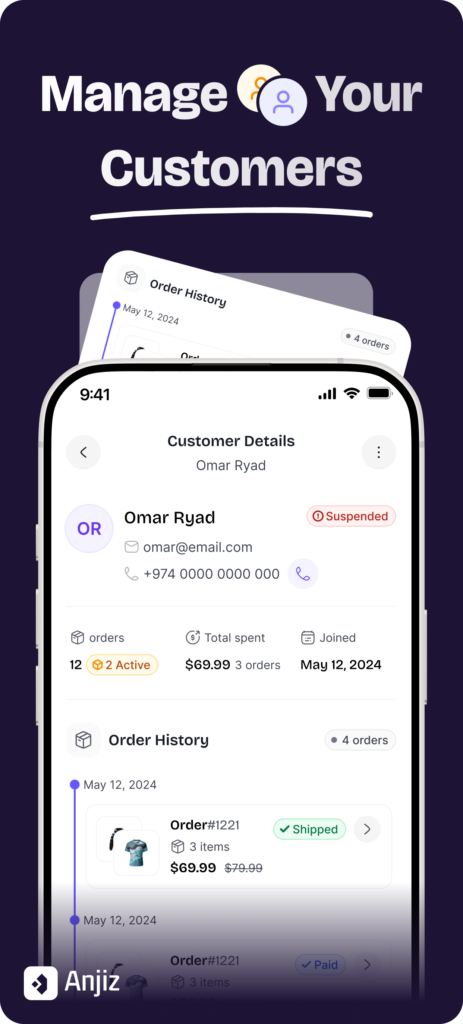
Anjiz keeps customer details and their order history together, so a name brings up everything they’ve bought.
The reason it’s hard to find is that the information lives in three places: customer details in WhatsApp, order details in a notebook, payment confirmations in your banking app. No single place has the full picture, so finding anything means checking all three.
The cost is higher than it looks. When you can’t see that someone has ordered three times this month, you miss the chance to thank them or offer something. Worse, you make mistakes — sending the wrong size because you were reading an old message, or missing a delivery instruction buried in a long thread.
Do I need a CRM for a small business?
Anjiz includes customer records as part of the app, so you don’t need a separate CRM alongside it.
You probably don’t need a traditional CRM. Tools like HubSpot and Salesforce were built for people at desks — long sales cycles, multiple stakeholders, email sequences. If you run a boutique, a home bakery, or a service business from your phone, they’re more work than they’re worth. Too many taps to record a simple order, and a long list of features you’ll never open.
What you actually need is simpler: a record of who bought what, when. That’s it.
How do I save a customer’s order history?
In Anjiz, recording an order under a customer builds their history automatically — there’s nothing separate to link or update.
The practical version, whatever tool you use:
- Save the customer once. Not just a name in your phone contacts — a record in the same place you record sales.
- Record the order under them. Items, any customisations, the price, the date.
- Let it accumulate. Every future order adds to the same record. You don’t maintain a history; it’s a byproduct of recording sales.
The reason this works is that there’s no cross-referencing step. If your customer list and your order list are separate, you have to connect them yourself every time — and that’s the step people skip when they’re busy.
How does order history help me sell more?
With Anjiz you can see what someone bought before, so “the usual” becomes something you can actually check.
Two things change once history is easy to find.
Service gets more personal. You can say: “I see you got the blue linen set in June — we just got a similar fabric in forest green, want photos?” That kind of thing used to require a personal shopper. Now it requires a record.
Repeat orders get faster. When someone says “the same as last time,” you can see what that was, confirm the price, and reply in seconds rather than spending ten minutes hunting. That speed isn’t just about looking professional — it means you can handle more orders without hiring anyone.
What’s the best way to track orders on my phone?
Anjiz is built for business owners who work from their phone, which is where notebooks and spreadsheets fall down.
Honest comparison:
- A notebook is reliable and needs no setup. It stops working when you need to search it, or when you’re away from it.
- A spreadsheet is free and flexible. It’s hard to navigate on a small screen, easy to break accidentally, and won’t show you one customer’s history without work.
- A general CRM is powerful and usually overkill — built around deals and pipelines rather than orders.
If a notebook currently works for you, keep using it. The switch is worth it when you find yourself searching for information more often than recording it.
Bottom line
Order history isn’t admin — it’s the thing that lets you answer “what did I get last time?” in seconds instead of minutes. Over time it also becomes genuinely useful data: what sells, who buys repeatedly, what to stock next.